An Introduction to AI and ChatGPT: Understanding the Capabilities and Limitations of OpenAI’s Popular Language Model

Tags :

Category : AI Technology

In recent years, the field of Artificial Intelligence (AI) has seen tremendous advancements, and one of the most exciting developments is the advent of large language models. One such model, developed by OpenAI, is called ChatGPT. In this article, we’ll take a closer look at what ChatGPT is, how it works, and its capabilities and limitations.

What is ChatGPT?

ChatGPT, short for “Conversational Generative Pre-training Transformer,” is a large-scale language model developed by OpenAI. It is based on the transformer architecture, which was introduced in the paper “Attention Is All You Need” by Google researchers in 2017. The transformer architecture has since become the foundation of many state-of-the-art language models, including ChatGPT.

ChatGPT was trained on a dataset of over 1 billion words, and it has the ability to generate human-like text. This means that it can be used to generate responses in a conversation, write creative fiction, or even code. It is currently being used in several applications such as chatbots, content generation and language translation.

How does ChatGPT work?

ChatGPT is a neural network-based model that is trained using a variant of the transformer architecture. The model consists of several layers of interconnected nodes, called neurons, which are trained to process input text and generate output text.

The input text is passed through an encoder, which converts the input text into a numerical representation that can be processed by the neural network. The encoder is typically made up of several layers of neurons, which are designed to learn the underlying structure of the input text.

The output text is generated by a decoder, which takes the encoded input text and generates a new sequence of words. The decoder is also made up of several layers of neurons, which are trained to generate text that is similar to the input text.

The model is trained using a variant of unsupervised learning called pre-training. This means that it is trained on a large dataset of text without any labels or supervision, and it is then fine-tuned on a smaller dataset with specific task such as chatbot generation or language translation.

Capabilities and Limitations

One of the biggest advantages of ChatGPT is its ability to generate human-like text. This makes it well-suited for applications such as chatbots, where the goal is to generate responses that sound natural and human-like. It can also be used for other applications such as content generation, language translation and summarization.

However, ChatGPT is not without its limitations. One limitation is that it is a statistical model and its output is based on the patterns it has seen during training. Therefore, it may not be able to generate text for unseen topics or for novel use-cases. Additionally, like any machine learning model, it may perpetuate biases present in the dataset it was trained on.

Another limitation is that it is a large model, and as such it requires significant computational resources to run. This may make it difficult to use in resource-constrained environments.

In conclusion, ChatGPT is a powerful language model that has the ability to generate human-like text. Its ability to generate text makes it well-suited for applications such as chatbots, content generation, and language translation. However, it is important to understand its limitations and to use it appropriately. With the rapid advancement of AI and language models, it’s exciting to see what new possibilities this technology holds for.


Is Your Wi-Fi as Secure as You Think? An Overview of Wi-Fi Security Standards

Wi-Fi is a wireless networking technology that allows devices to connect to the internet using radio waves. Wi-Fi security is the protection of data transmitted over wireless networks. As Wi-Fi technology has evolved, so have the security protocols that protect it.

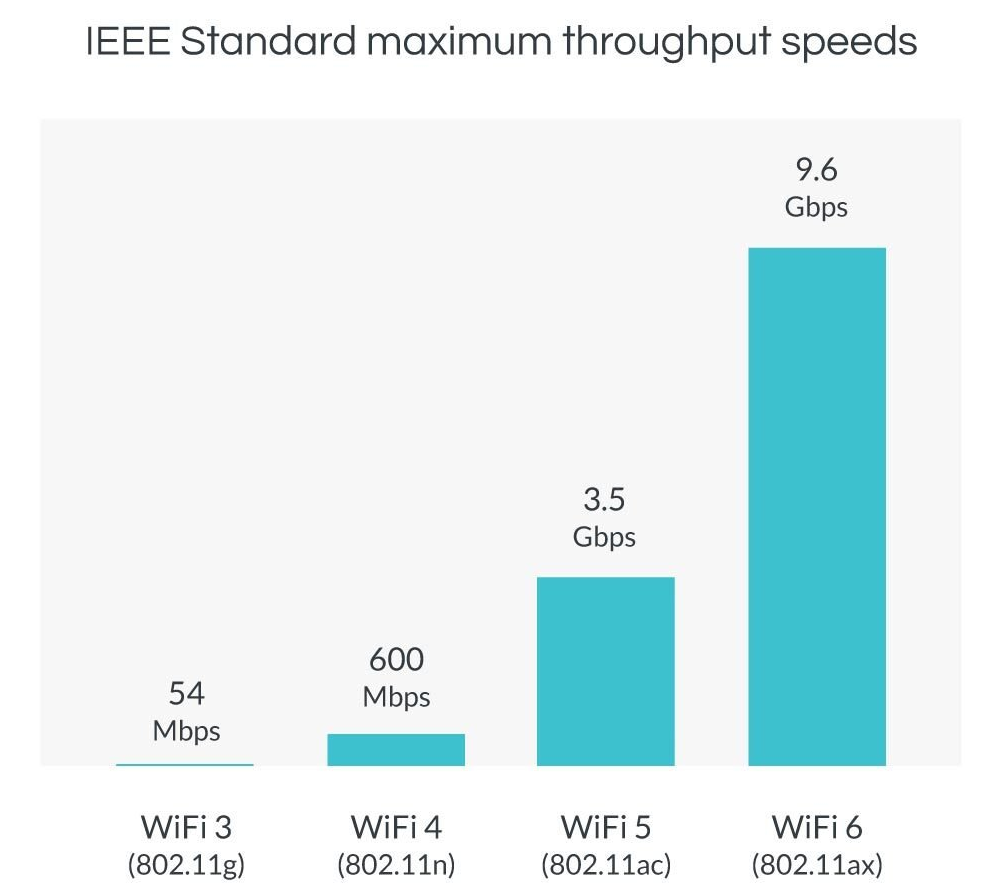
There are several standards for Wi-Fi, which are denoted by the numbers “4”, “5”, and “6”. These numbers refer to the generation of the Wi-Fi standard, with newer generations offering faster speeds and more advanced features than older ones.

  • Wi-Fi 4, also known as 802.11n, was released in 2009 and operates in the 2.4 GHz and 5 GHz bands. It has a maximum theoretical data transfer rate of 600 Mbps and uses multiple-input multiple-output (MIMO) technology to improve range and performance.
  • Wi-Fi 5, also known as 802.11ac, was released in 2014 and operates only in the 5 GHz band. It has a maximum theoretical data transfer rate of 3.5 Gbps and uses MIMO technology, as well as beamforming to improve range and performance.
  • Wi-Fi 6, also known as 802.11ax, was released in 2019 and operates in the 2.4 GHz and 5 GHz bands. It has a maximum theoretical data transfer rate of 9.6 Gbps and uses MIMO technology, as well as orthogonal frequency-division multiple access (OFDMA) to improve range and performance. It is also designed to be more efficient and able to support more devices simultaneously than previous generations.

Newer Wi-Fi standards offer faster speeds and better performance than older ones. However, to take advantage of these improvements, both the device and the Wi-Fi router must support the same standard.

It is important to note that while newer Wi-Fi standards offer improved security measures, no security protocol is foolproof. It is always a good idea to use strong passwords, enable two-factor authentication, and keep your devices and router software up to date to protect your Wi-Fi network.


Implementing a Phishing Simulation Program as Part of Your Security Awareness Strategy

Phishing attacks are a common and highly effective way for cybercriminals to trick individuals into revealing sensitive information. These attacks can be particularly damaging to companies and organizations, as they can result in the theft of login credentials, financial information, and other sensitive data. In order to protect against phishing attacks, it is important for companies and organizations to implement a security awareness program that educates employees about the risks of phishing and how to identify and report suspicious messages.

One effective way to do this is through the use of phishing simulations. These simulated attacks allow organizations to test the effectiveness of their security awareness training and identify areas for improvement. Here are the steps for implementing a phishing simulation program:

  1. Choose a phishing simulation tool: There are a number of free and paid tools available for conducting simulated phishing attacks. Some examples include PhishMe, GoPhish, and Phishing Frenzy. Choose a tool that meets your organization’s needs and budget.
  2. Develop a plan: Determine the goals of your phishing simulation program and how it will fit into your overall security awareness strategy. This should include how often simulations will be conducted, who will be targeted, and what types of phishing attacks will be simulated.
  3. Create the simulated phishing attacks: Use your chosen tool to create customized phishing campaigns that mimic real-world attacks. This may include crafting fake emails or text messages that appear to be from legitimate sources and include links or attachments that are designed to trick recipients into revealing sensitive information.
  4. Conduct the simulations: Send the simulated phishing attacks to the targeted employees and track their responses. This will allow you to see how effective your security awareness training has been and identify areas for improvement.
  5. Analyze the results: Use the results of the simulations to evaluate the effectiveness of your security awareness training and identify areas for improvement. This may include providing additional training to employees who are particularly susceptible to phishing attacks, or adjusting your training program to better meet the needs of your organization.

There are a number of free phishing frameworks that organizations can use to conduct simulated phishing attacks and measure the effectiveness of their security awareness program. Some examples include:

  • SniperPhish: An open-source phishing tool that allows users to create and send customized phishing campaigns. Can be used for educational purposes, such as testing the effectiveness of security awareness training or demonstrating the risks of phishing to employees. One of the key features of Sniperphish is its ability to generate tracker code for phishing websites and track data from both the phishing website and mail campaign in a single dashboard.
  • GoPhish: Another open-source phishing framework that allows organizations to create and send customized phishing campaigns. Provides the ability to track the results of campaigns and includes a training module to educate employees about how to spot phishing attacks.
  • PhishMe: A tool that allows organizations to send simulated phishing emails to employees and track their responses. Provides training resources and analytics to help organizations improve their security awareness. Can be used to test the effectiveness of security awareness training and identify areas for improvement.

By conducting phishing simulations on a regular basis, organizations can significantly enhance their defenses against actual phishing attacks and safeguard against potential harm.